
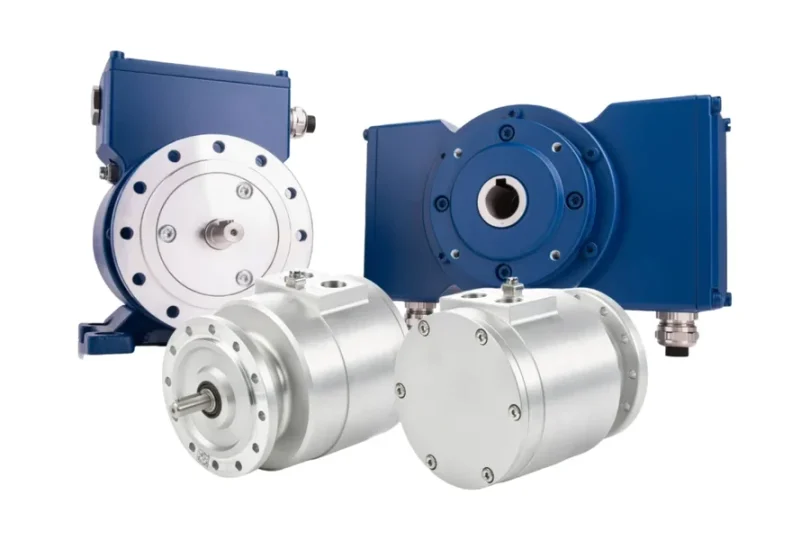

What incremental encoders do and how they measure position
They track rotary or linear motion by generating a series of digital pulses as the shaft moves — no absolute position memory required.
Signal types (A/B/Z), resolution, and interface compatibility
Understand how A and B channels provide directional feedback, how Z (index) helps with homing, and what PPR (pulses per revolution) means for accuracy.
Where incremental encoders are used in real-world systems
From conveyor belts to robotic joints and CNC spindles, incremental encoders are a cost-effective way to get reliable motion feedback.
Key pros and cons vs absolute encoders
They’re simple, fast, and affordable — but lose position info on power loss. I’ll walk you through when that’s acceptable (and when it’s not).
How to wire and align them during setup
I’ll share field tips on proper cable shielding, index alignment, and using an oscilloscope to verify signal phase — saves headaches later.
What Is an Incremental Encoder and How Does It Work?
Let’s break this down in plain terms — because if you’ve ever set up a servo or stepper motor with feedback, chances are you’ve dealt with incremental encoders.
At the core, an incremental encoder measures relative position. It doesn’t care where zero is unless you define it — it simply counts pulses as the shaft turns.
PPR: Pulses per Revolution, Explained Simply
Think of the baumer encoder disc like a spinning wheel with evenly spaced stripes printed around its edge. Each time the wheel turns, the encoder counts how many stripes pass by a fixed sensor. The number of these “stripes” per full turn is your PPR — pulses per revolution. A 1,000 PPR encoder, for example, will output 1,000 digital pulses for every full rotation of the shaft.
The higher the PPR, the finer the motion you can detect. So for high-precision applications — like CNC cutting or robotic arms — you’ll want more pulses per turn. For simple conveyor motors or basic tracking? Lower PPR gets the job done.
How A/B/Z Channels Work: Quadrature Signals
Incremental encoders typically have three output channels: A, B, and Z.
- A and B are square wave signals that are offset (90° out of phase), allowing your controller to determine both speed and direction. This is called quadrature encoding.
- Z is a special one-time pulse that fires once per revolution — often used for homing or zeroing the system.
If you’re wiring this up, always make sure your controller supports quadrature decoding. That’s how you unlock the direction and resolution benefits.
The Internal Working Principle
Most incremental encoders use either optical or magnetic sensing:
- Optical encoders have a rotating disc with transparent and opaque segments. A light source shines through, and a photodetector reads the on/off pattern.
- Magnetic encoders rely on a rotating magnetic ring and a Hall-effect sensor to detect changes in magnetic fields as the disc spins.
Both technologies achieve the same goal: generating consistent, readable pulses for every bit of motion.
Real-World Analogy
Imagine you’re standing beside a giant wheel with alternating black and white stripes on the rim. Each time the wheel turns, you count how many black stripes pass by your eye. That’s essentially what the encoder is doing — just much faster and far more accurately.
Key Specs and Output Options of Incremental Encoders
When choosing an incremental encoder, understanding its signal outputs, mounting styles, and electrical compatibility is just as important as knowing its resolution. Here’s a quick breakdown of the core specs you’ll encounter — and what they mean in real-world integration.
Whether you’re wiring into a PLC, sizing for a VFD, or trying to fit an encoder into tight motor housing, this table helps you compare the most relevant features.
Feature Comparison Table
| Feature | Options / Range | What It Means in Practice |
| Output Channels | A/B/Z (Single-ended or Differential) | Differential offers better noise immunity (recommended near motors) |
| Resolution (PPR) | 100 to 10,000+ | Higher PPR = better precision; typical for CNC and servo systems |
| Mounting Types | Solid Shaft, Hollow Shaft, Blind Shaft | Choose based on motor shaft design and available space |
| Output Formats | TTL, HTL, Push-Pull, Line Driver | Match voltage and logic level to your drive or |
This table becomes especially useful when speccing encoders for retrofit projects or high-speed applications. I usually go with differential line driver (A/B/Z) for anything in a noisy industrial panel — it helps avoid false counts and saves hours of troubleshooting.
How to Choose the Right Incremental Encoder
Choosing the right incremental encoder isn’t just about resolution — it’s about matching every spec to your actual system environment. Whether I’m integrating with a VFD, a PLC, or just retrofitting onto a small motor assembly, these are the five steps I walk through every time:
1. Shaft Type (Solid, Hollow, or Blind)
First, check the motor or shaft setup. Solid shafts require couplings and careful alignment. Hollow or blind shaft encoders, on the other hand, mount directly — saving space and simplifying install.
2. Determine the Required Resolution (PPR)
Ask yourself: how much precision do you actually need? For slow, coarse positioning, 100–500 PPR might do. For fine control — say in CNC or servo systems — go with 1,000+ PPR. Don’t over-spec if you don’t need it.
3. Signal Output Type and Controller Compatibility
TTL, HTL, line driver, open collector — it all depends on what your PLC or drive accepts. If you’ve got long cable runs or electrical noise nearby, I always recommend differential line drivers for signal integrity.
4. Environmental Considerations
Look at the IP rating and shock/vibration specs. For example, food and beverage lines usually need washdown protection (IP67+). Outdoor setups? Make sure the temp rating and seals can handle it.
5. Mounting and Alignment Constraints
Some setups have limited space — servo mounts work best there. And always factor in whether you need an anti-rotation tab, flexible coupling, or special bracket for vibration.
In short: Choose the encoder like you’d choose a sensor — not by brand, but by what your application demands. Don’t guess — check the mechanical fit, electrical output, and system noise tolerance.
Wiring and Installing an Incremental Encoder — Field Tips
Wiring an incremental encoder might look straightforward on paper, but in the field, small mistakes can cost you hours of debugging. Here’s what I always double-check during install — and what I recommend to every tech I train:
- Match the Encoder Voltage
Start with the basics: power. Most encoders operate at 5V, 12V, or 24V — sending 24V to a 5V unit will cook it. Double-check both the encoder datasheet and your PLC/drive input before applying power.
- Use Shielded Twisted Pair for A/B Channels
Especially when working near VFDs or high-current motors, noise is your enemy. I always run A/B (and Z) channels over shielded twisted-pair cables to cut down on electromagnetic interference.
- Ground Properly
Always ground the encoder housing and cable shield — ideally at the control cabinet side only. Floating shields or multiple ground points can introduce signal instability or phantom voltages.
- Align the Index (Z) Pulse with Mechanical Zero
If your application uses the Z signal for homing, take the time to mechanically align it with the system’s true zero. Mark it during setup — this saves tons of time later during service or recalibration.
- Verify with an Oscilloscope
Don’t just trust your logic analyzer or PLC feedback. Hook up an oscilloscope to check pulse shape, phase offset between A and B (should be 90°), and clean signal rise/fall. It’s the quickest way to catch wiring or noise issues before they become intermittent headaches.
Pro Tip: If the signals look noisy or jittery, check grounding first — it fixes 80% of encoder headaches in my experience.
Pros and Cons of Using Incremental Encoders
Having worked with dozens of encoder setups — from conveyor tracking to robotic arms — I can confidently say that incremental encoders are often the go-to for quick installs and tight budgets. But they’re not without trade-offs. Here’s how I weigh them out in real-world systems:
Pros
- Simple and Cost-Effective
Incremental encoders are affordable and easy to source. You don’t need complex interfaces or high-end controllers to use them — just count pulses and you’re good to go.
- High Speed and Good Resolution
Many models offer up to 10,000 PPR, which is more than enough for precision control in most motion tasks. They also handle high-speed rotation without lag, making them a strong fit for servo motor feedback.
- Easy Integration with PLCs and Drives
A/B (and sometimes Z) signals are standard on most motion controllers. Whether you’re using Siemens, Allen-Bradley, or a generic VFD, chances are it just works out of the box.
Cons
- No Absolute Position on Startup
The biggest drawback: incremental encoders don’t remember position after power loss. Every reboot means your system is blind — unless you add a homing routine.
- Requires Homing Sequence After Power Loss
You’ll need a reference sensor or mechanical hard stop to recalibrate each time the system resets. That’s extra logic, time, and potential downtime.
- Sensitive to Noise if Not Wired Correctly
If you don’t use shielded cable, proper grounding, or differential inputs, expect false counts, jittery readings, or intermittent faults — especially near VFDs or relays.